
1. What is a Business Process Flow (BPF) and why is it used?
A Business Process Flow (BPF) is a visual, stage-based guide shown at the top of a form in a Model-Driven App. It helps users understand where they are in the process and what must be completed before moving forward.
- Ensures a consistent process across users
- Prevents missing required information
- Shows required steps clearly
- Tracks progress stage by stage
Example: Project approval flow with multiple approval levels (L1 to L4).
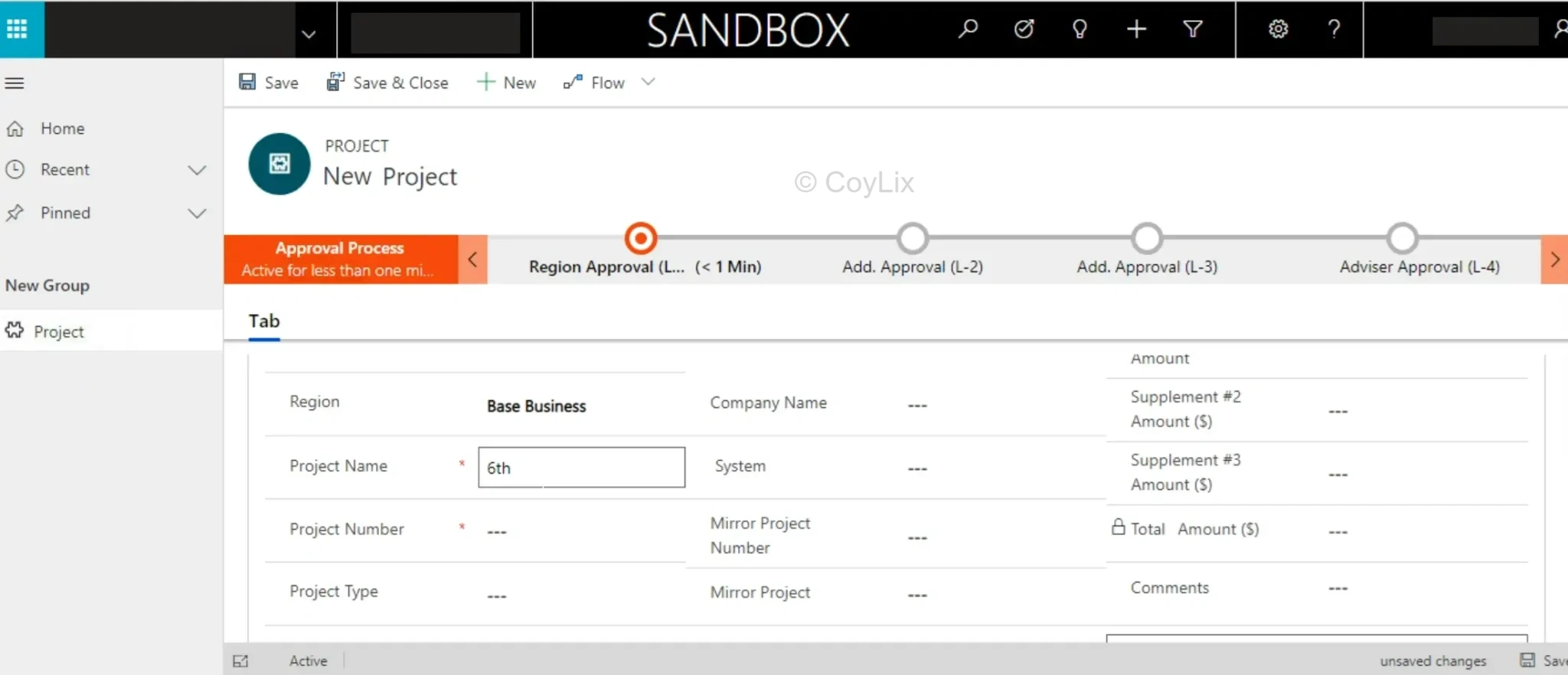
Main Takeaway: BPF ensures structured and consistent business processes.
2. How do you manage Security Roles in Model-Driven Apps?
Security Roles control who can access what in a Model-Driven App.
- Read (View)
- Write (Edit)
- Create
- Delete
- Append / Append To
Steps to Manage
- Go to Power Apps → Solutions → Security Roles
- Create or edit roles
- Assign permissions
- Assign roles to users or teams
Example:
- HR Manager → full access
- Employee → own records only
- Recruiter → create but cannot delete
Main Takeaway: Security roles act as access control keys.
3. What is the purpose of Solutions in the Power Platform?
A Solution is a container used to group and transport app components.
- Tables
- Apps
- Flows
- BPFs
- Security roles
Why use Solutions?
- Move Dev → Test → Production
- Maintain version control
- Support ALM
- Keep projects organized
Types
- Managed → Production, locked
- Unmanaged → Development, editable
Main Takeaway: Solutions help package and deploy apps efficiently.
Practicing Model-Driven Apps security roles interview questions helps you confidently answer real-world access control scenarios.
4. What are Quick Create Forms in model driven apps and when would you use them?
Quick Create Forms are lightweight forms used for fast data entry without leaving the current screen.
- Popup-based form
- Minimal fields
- Faster record creation
- Mobile-friendly
When to use?
- Speed up data entry
- Avoid navigation disruption
- Capture essential data only
Main Takeaway: Quick Create Forms improve user productivity.
5. What is the significance of Sitemap in Model-Driven Apps? How do you configure it?
The Sitemap controls the navigation structure of a Model-Driven App.
- Defines sections
- Defines groups
- Defines navigation links
Why important?
- Improves user experience
- Shows relevant data
- Hides unnecessary items
Configuration Steps
- Go to Power Apps → Solutions
- Open Model-Driven App
- Edit Sitemap
- Add groups and pages
- Save and publish
Main Takeaway: Sitemap is the navigation backbone of your app.
Final Thoughts
Mastering these Model-Driven Apps interview questions for beginners helps you build a strong foundation in Power Platform.
Focus on understanding concepts rather than memorizing answers.
FAQ
What is BPF in Power Apps?
A stage-based process guide used to standardize workflows.
Can users have multiple security roles?
Yes, permissions are combined from all roles.
What is a managed solution?
A locked solution used in production environments.
Are Quick Create Forms mandatory?
No, they are optional but improve usability.
What does Sitemap control?
It controls app navigation and structure.




