
Interview Questions & Project Explanations:
1. How do you explain a real Power Platform project in interviews?
A strong project explanation should always follow a structured approach: context, problem, solution, tech stack, and business impact.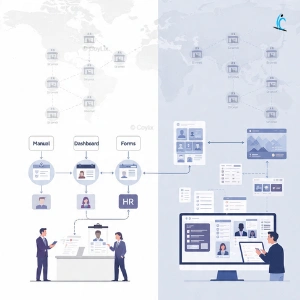
Most candidates make the mistake of jumping directly to tools. Instead, you should first explain the business scenario — what kind of organization it was, what scale it operated at, and what challenges existed.
For example, in the HR automation project, instead of saying “I built an app,” you should explain:
“This project was for a retail organization with 3,500+ employees and high monthly hiring. The HR team was struggling with manual ID card creation, which caused delays and errors.”
This approach immediately shows clarity, business understanding, and structured thinking — which is exactly what interviewers look for.
2. What was the business problem in the HR automation project?
The HR team was handling ID card creation manually using paper forms and design tools. While this process may work for small organizations, it became a major bottleneck at scale.
With more than 200 employees joining every month, HR teams had to manually collect data, verify details, create ID cards, and distribute them. This led to delays and inefficiencies.
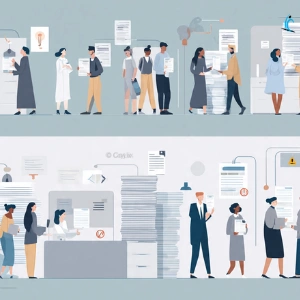
The real business impact was:
- 3–5 days turnaround time for ID cards
- High dependency on HR teams
- Frequent data entry errors
- No tracking or visibility for managers
In interviews, always explain problems in terms of scale and impact, not just process.
3. What solution did you design for HR automation?
The solution was designed to fully automate the ID card generation process using Power Platform.
Instead of multiple manual steps, a structured automated workflow was implemented:
First, employee data was collected using Microsoft Forms. This ensured standardized input and eliminated manual form handling.
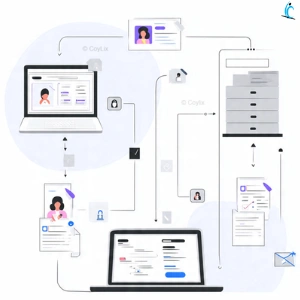
Then, the data was stored in SharePoint for tracking and validation. Power Automate was used to trigger workflows whenever a new submission was received.
Using Word templates, ID cards were generated dynamically with employee details and photos embedded. Finally, Outlook was used to send automated notifications.
This end-to-end automation removed manual effort and ensured consistency across all ID cards.
4. What business impact did this HR project deliver?
This is the most important part of your explanation because it shows real value.
After implementing the solution:
- ID card creation reduced from 3–5 days to under 2 minutes
- HR saved around 80 hours per month
- Manual errors were eliminated
- Peak hiring periods were handled smoothly
- New employees could start work immediately
In interviews, numbers make your project believable. Without metrics, your project sounds like a basic implementation.
5. Why was Power Automate used in this project?
Power Automate was selected because it integrates seamlessly with Microsoft ecosystem tools such as Forms, SharePoint, Word, and Outlook.
Instead of building custom backend logic, workflows could be created using low-code automation. This reduced development effort and ensured reliability.
In interviews, always explain tool selection as a decision — not just a usage.
6. What challenges did you face in this project?
Real-world projects always involve challenges, and explaining them shows practical experience.
In this project, key challenges included handling employee photo uploads, avoiding duplicate submissions, embedding images correctly into Word templates, and ensuring the system worked during peak hiring periods.
These challenges required careful validation, structured data handling, and testing under high load conditions.
7. What problem did the manufacturing project solve?
The second project focused on a manufacturing company where maintenance tracking was handled using paper and Excel.
This created serious operational inefficiencies because managers had no real-time visibility into machine status or maintenance schedules.
As a result:
- Machines failed unexpectedly
- Preventive maintenance was missed
- Production downtime increased
- Audit tracking became difficult
This clearly shows how manual processes can directly impact business operations.
8. What solution was implemented in the manufacturing system?
A digital maintenance system was built using Power Apps and Dataverse to bring real-time visibility and control.
Technicians used a mobile app to log issues directly from the factory floor. Work orders were created automatically and assigned to technicians.
Preventive maintenance alerts ensured machines were serviced before failure. QR codes allowed instant access to machine history.
Dashboards provided managers with real-time insights, and ERP integration ensured smooth spare parts management.
This transformed the system from reactive maintenance to proactive operations.
9. Why was Dataverse used instead of SharePoint?
Dataverse was chosen because it supports complex relationships, structured data, and enterprise-level scalability.
In this project, multiple entities like machines, work orders, technicians, and maintenance logs needed to be connected. Dataverse provides relational capabilities that SharePoint cannot handle efficiently at scale.
It also supports security roles, business rules, and better performance for large datasets.
10. How do you handle follow-up questions in interviews?
Follow-up questions test how deeply you understand your project. This is where most candidates fail.
You should always answer based on your actual role and decisions:
- Explain what you built end-to-end
- Justify why you chose specific tools
- Share real challenges and how you solved them
- Suggest future improvements
For example, saying “I would automate ID card printing next” shows forward thinking.
11. What was the customer support project about?
The third project focused on building a unified customer support system using Power Pages and Dataverse.
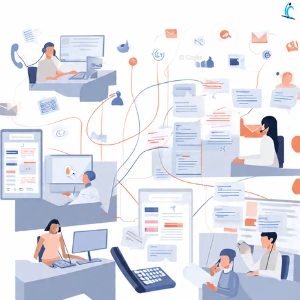
The main challenge was handling complaints coming from multiple channels such as calls, emails, and portals.
Without a centralized system, customer history was fragmented, and agents lacked context while resolving issues.
12. What impact did the customer support system deliver?
This project delivered measurable improvements across operations and customer experience.
- Resolution time reduced from 48 hours to 18 hours
- First-contact resolution improved to 76%
- Customer satisfaction increased from 3.2 to 4.1
- 35% productivity improvement
- $320K annual savings
This shows how Power Platform solutions can directly impact both efficiency and business outcomes.




