
Introduction
Model-Driven Apps Interview Questions for Beginners are essential for anyone preparing for Power Platform interviews, especially when working with data-driven applications in Microsoft Dataverse.Unlike Canvas Apps, where you design every screen manually, Model-Driven Apps focus on the underlying data model, relationships, and business processes. This makes them highly suitable for enterprise-level applications where structure, security, and automation matter more than UI customization.In this guide, we’ll cover the most important core concepts that interviewers frequently ask — including Dataverse, forms, views, and business logic. Each question is explained with real-world context so you can confidently answer in interviews.By the end of this article, you’ll have a clear understanding of how Model-Driven Apps work and how to explain them effectively in interviews.Who Should Read This
- Power Platform beginners preparing for Model-Driven Apps interview questions
- Developers transitioning from Canvas Apps to Model-Driven Apps
- Professionals working with Dataverse, business rules, and enterprise applications
- Anyone looking to understand data-driven app design in Power Apps
- Candidates preparing for Power Apps or Dynamics 365 technical interviews
1. What is a Model-Driven App in Power Apps? How is it different from a Canvas App?
A Model-Driven App is a type of application in Power Apps that is built primarily on your data model rather than user interface design. Instead of designing screens manually, the app automatically generates UI components like forms, views, and dashboards based on the structure of your data in Dataverse.
Think of it like a fully furnished apartment — the layout, structure, and rooms are already defined. You just configure and use them instead of building everything from scratch.
Key Characteristics of Model-Driven Apps
- Built on Dataverse tables and relationships
- User interface is automatically generated
- Focus is on data structure and business logic
- Minimal effort required for UI design
- Supports complex business processes and workflows
How it differs from Canvas Apps
- Model-Driven Apps are data-first, while Canvas Apps are UI-first
- Model-Driven Apps use auto-generated layouts, while Canvas Apps require manual design
- Better suited for complex, enterprise-level applications
- Canvas Apps are ideal for highly customized user experiences
Real-World Example
A Purchase Order Approval System is a perfect example where Model-Driven Apps are preferred.
- Multiple approval stages like Manager, Finance, and Director
- Conditional business rules (e.g., amount > 10,000 requires director approval)
- Structured relationships between purchase orders, users, and approval status
Using Dataverse, the system automatically generates forms, views, dashboards, and business process flows to track approvals step by step — without designing screens manually.
Key Takeaway: Model-Driven Apps focus on data and processes, while Canvas Apps focus on design and user experience.
2. Explain the role of Dataverse in Model-Driven Apps. Why is it mandatory?
Dataverse is the foundation of Model-Driven Apps. It acts as the central database where all your application data, relationships, and business logic are stored.
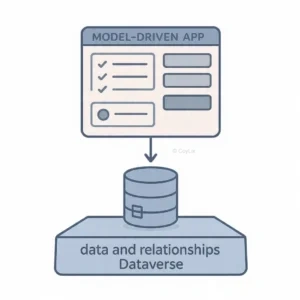
What Dataverse Provides
- Tables to store structured data
- Relationships between tables
- Business rules, workflows, and calculated fields
- Security at row-level and column-level
- Data validation and logic enforcement
Dataverse is the underlying data platform for Power Apps that enables secure, scalable data storage with built-in business logic and validation.
Model-Driven Apps use this metadata to automatically generate forms, views, dashboards, and navigation.
Key Takeaway: Dataverse is mandatory because Model-Driven Apps are completely built on top of its data model.
3. What are Forms in Model-Driven Apps? How do you customize them?
Forms are user interface screens used to display and edit a single record from a Dataverse table, such as Account, Opportunity, or Case.
How to Customize Forms
- Add or remove fields
- Rearrange sections and tabs
- Apply business rules (e.g., hide/show fields)
- Add custom controls for better user experience
Types of Forms in Model-Driven Apps
- Main Form: Full view for creating and editing records
- Quick View Form: Read-only data from related records
- Quick Create Form: Minimal form for fast record creation
- Card Form: Compact layout for dashboards
For example, in a Sales app, the Opportunity Main Form may include revenue, stage, and contacts, while a Quick Create Form allows users to quickly add leads during a call.
Key Takeaway: Forms are flexible data entry screens that can be customized to improve usability and efficiency.
4. What are Views in Model-Driven Apps? How do they differ from Forms?
Views are predefined lists of records from a Dataverse table that help users browse, filter, and analyze data efficiently.
What Views Control
- Which records are displayed
- Which columns are visible
- Sorting and filtering criteria
- User accessibility
Types of Views
- Personal Views: Created by users for individual use
- System Views: Default views used by the system
- Public Views: Shared views available to all users
Views vs Forms
- Views display multiple records; Forms display a single record
- Views are used for browsing and filtering data
- Forms are used for creating and editing records
- Views have limited customization; Forms support business logic and UI control
Key Takeaway: Views help users find data quickly, while Forms allow them to interact with and modify that data.
5. What are Business Rules and how do they differ from Business Process Flows?
Business Rules and Business Process Flows (BPF) serve different purposes in Model-Driven Apps.
Think of Business Rules as traffic signals controlling specific actions, while BPF acts like a GPS guiding users through a complete process.
Business Rules
- Control field behavior within forms
- Show or hide fields
- Enable or disable fields
- Set or validate field values
- Display error messages
Business Process Flows (BPF)
- Guide users through stages (Step-by-step process)
- Ensure process consistency
- Work across multiple tables
- Track progress from start to completion
Key Differences
- Business Rules = field-level logic
- BPF = process-level guidance
- Rules work inside a form
- BPF spans across multiple stages and entities
Key Takeaway: Business Rules control how fields behave, while BPF ensures users follow the correct business process.




