
Questions Section
Can Power Apps Handle 1 Million Records?
Yes, Power Apps can support applications connected to datasets containing 1 million records, but only when the solution is designed correctly. The real challenge is not storing 1 million rows. The challenge is how the app queries, filters, retrieves, and displays data.
If an app tries to load full tables directly into galleries or collections, performance will degrade quickly. If the architecture uses delegable filters, indexed fields, search-first user experience, pagination, and optimized formulas, Power Apps can work efficiently even with very large datasets.
The correct answer in interviews is: Power Apps can handle large datasets when the architecture is designed for scale.
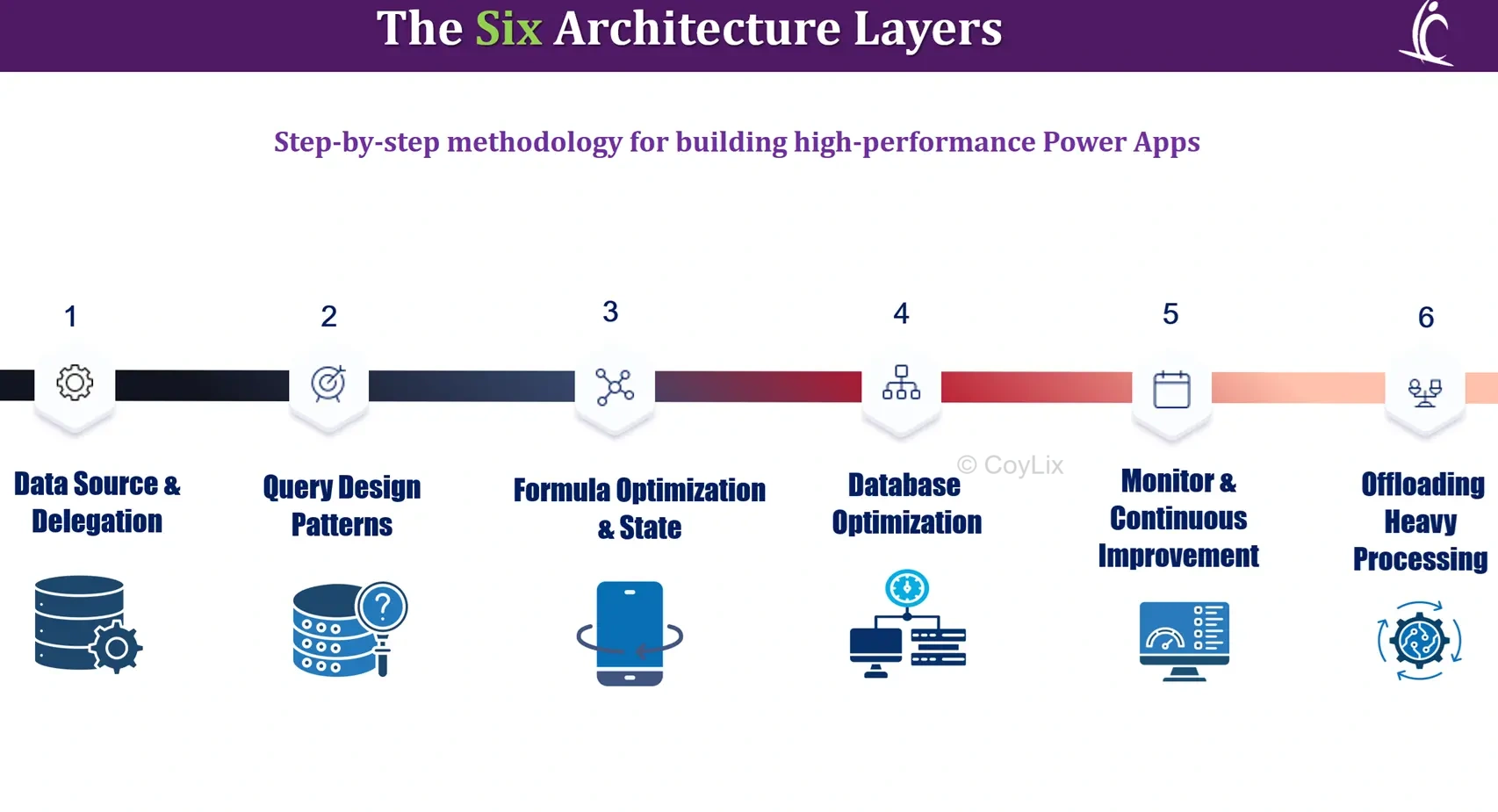
What Is the Wrong Question to Ask About Performance?
Many people ask: Can Power Apps handle 1 million records?
That is the wrong question because performance is not decided by row count alone. A poorly designed app can struggle with 20,000 records, while a well-architected app can perform well against millions of records.
The better question is:
Can our architecture handle 1 million records?
This shifts focus toward delegation, database design, indexing, query strategy, and user experience patterns.
Pillar 1: Data Source Choice?
The first architectural decision is choosing the right data source.
For large-scale systems, use platforms designed for scale such as:
- Dataverse
- SQL Server
These platforms support stronger querying, indexing, relationships, and enterprise workloads.
SharePoint may work for moderate workloads, but it becomes more difficult at high volume scenarios. Excel should be used for prototypes or lightweight apps, not enterprise systems.
If starting fresh and scale matters, Dataverse is usually the stronger long-term option.
Why Is Delegation Critical for Large Datasets?
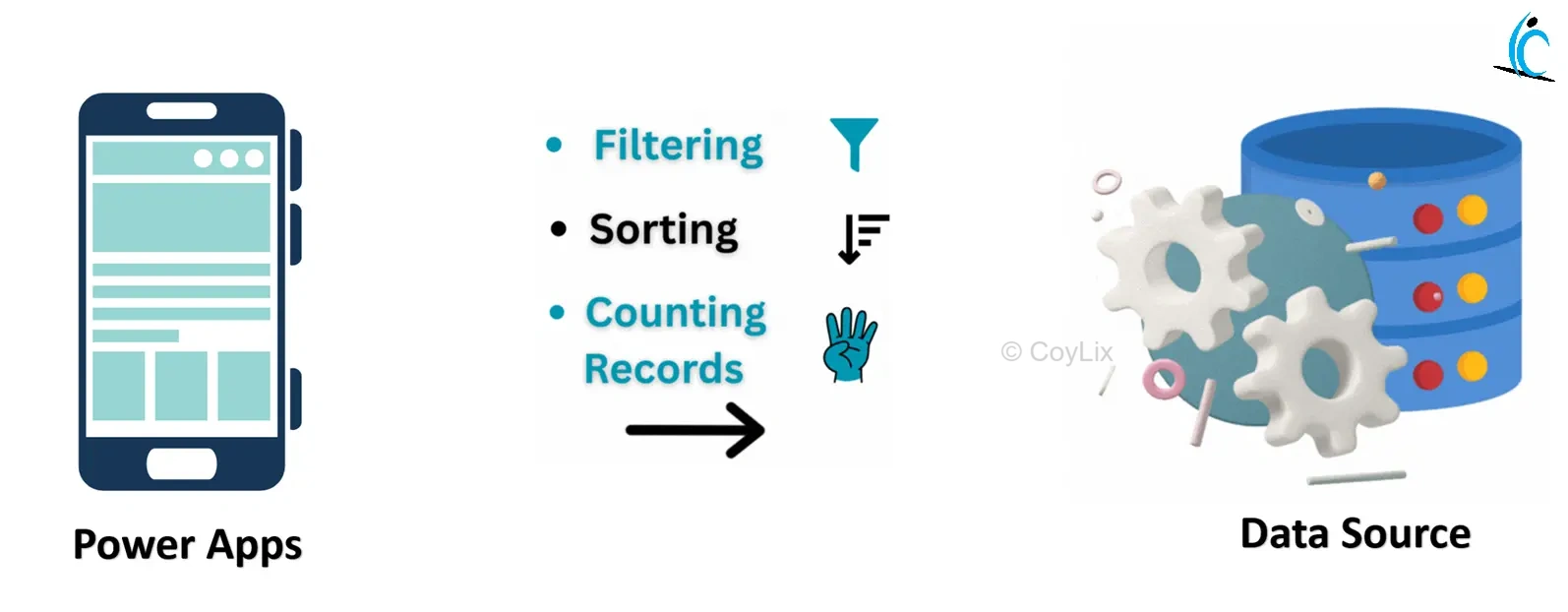
Delegation means Power Apps sends data processing work to the data source instead of processing records inside the client app.
For example, when a user searches records, the database performs the filtering and returns only matching rows. This avoids downloading unnecessary data.
Without delegation, Power Apps evaluates only a limited set of records locally. This creates incomplete results and slower performance.
For large apps, delegation is not optional. It is foundational architecture.
What Is the Best Delegation Testing Trick?
A practical development technique is setting the Data Row Limit to 1.
If the app still returns correct results, the formula is likely delegable. If screens break or records disappear, the formula probably relies on local processing.
This is a fast way to detect design issues early before production data grows.
Pillar 2: Query Design Patterns?
Large apps should never load all records on startup. Instead, design around user intent.
Recommended patterns:
- Search-first experience
- Filter-first experience
- Date range filtering
- Cascading dropdown filters
This ensures the system retrieves only relevant data when the user requests it.
Intent-driven design removes expensive full-table scans.
How Do UI Patterns Improve Performance?
User interface design directly impacts performance.
Good UI patterns force meaningful filters before data loads. Examples include:
- Search boxes
- Status filters
- Department dropdowns
- Date range selectors
Bad UI patterns allow empty queries that pull wide datasets unnecessarily.
Performance often improves when the UI guides user intent.
Pillar 3: Formula Optimization and State?
Slow apps often make repeated calls to the same data source.
Example of poor design:
LookUp(Orders, ID = varID).Amount
LookUp(Orders, ID = varID).Tax
This repeats the same lookup multiple times.
Better design:
Set(varOrder, LookUp(Orders, ID = varID));
varOrder.Amount + varOrder.Tax
This stores the record once and reuses it, reducing network traffic and improving responsiveness.
How Should App OnStart Be Used?
App.OnStart should mainly load configuration values, feature flags, or lightweight startup settings.
Transactional or high-volume data should load when users navigate to the relevant screen, not during startup.
This creates faster launch times and better user experience.
What Is the Collection Trap?
A common mistake is loading full tables into collections:
ClearCollect(colAllOrders, Orders)
With large datasets, this can cause:
- Very slow startup
- Heavy memory use
- Mobile crashes
- Long refresh times
Collections are useful for small static lists, but not for loading enterprise datasets.
Pillar 4: Database Optimization?
App speed is heavily influenced by the backend database.
Important fields should be indexed, especially:
- ID columns
- Status columns
- Date columns
- Search fields
Without indexes, queries scan more data and slow down significantly. With indexes, response times can improve dramatically.
What Are Server Objects Like Views?
Use server-side objects such as:
- Dataverse Views
- SQL Views
These can provide pre-filtered, pre-joined, and business-ready data.
They are useful when logic would otherwise require complex formulas such as grouping or combining tables inside Power Apps.
Let the backend perform heavy processing whenever possible.
Pillar 5: Monitoring?
Performance should be measured, not guessed.
Use Power Apps Monitor to review:
- Rows returned
- Request duration
- Payload size
- Delegation warnings
The right process is:
Measure → Fix → Measure Again
Pillar 6: Offloading Heavy Processing?
Some operations should not run in the app client.
Examples:
- Bulk updates
- Large aggregations
- Complex transformations
These can be offloaded to:
- Power Automate
- Azure Functions
- Custom APIs
However, Power Automate can add latency, so it should be used strategically.
What Is the Recommended Pagination Strategy?
Instead of loading huge galleries, load data in pages.
Recommended page size:
- 50 records
- 100 records
Add Next and Previous controls so users move through data gradually.
This reduces memory load and improves gallery responsiveness.
How Would You Design a Finance App With 2 Million Transactions?
A scalable solution would include:
- Dataverse or SQL backend
- Delegable filters
- Search-first interface
- Indexed transaction fields
- Pagination
- Validation through Monitor
This design avoids full-table loads and supports enterprise usage.
What Is the Best Interview One-Liner for Large Dataset Performance?
Never load large tables directly. Use delegable queries, search-first UI, indexed backend, pagination, and validate with Monitor.
This shows solution architect thinking instead of beginner-level app building.
What Is the Final Takeaway?
Power Apps is enterprise-ready when built correctly.
Performance is not a platform limitation in most cases. It is an architecture decision.
Teams that master the six pillars can build faster, scalable, production-grade apps with confidence.




