
When working with Microsoft Dataverse, understanding its core components is essential. Dataverse is the data backbone for the Microsoft Power Platform, enabling organizations to securely store, manage, and relate their business data. Whether you are building Power Apps, Power Automate flows, or analyzing data in Power BI, the Dataverse data model forms the foundation.
In this article, we’ll break down the core components of the Dataverse data model with examples so you can grasp how they work together.
1. Tables
At the heart of Dataverse are tables, which function like structured storage containers similar to relational database tables.
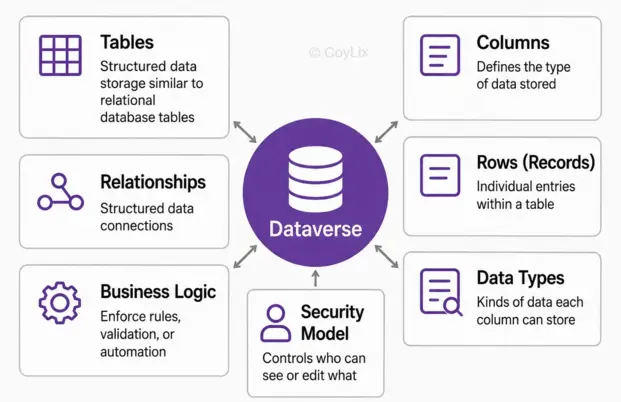
Tables store business data such as customers, invoices, or orders.
Each table represents a business entity.
Example: A Customer table might contain records like “ABC Corp” or “XYZ Pvt Ltd.”
👉 Think of a table as a spreadsheet where each row is a record and each column is a field.
2. Columns
Columns (also called fields or attributes) define the type of data that a table can store.
Each table is made up of multiple columns.
Data types include text, numbers, dates, currency, choices, or lookups.
Example: The Customer table might have columns like CustomerName, PhoneNumber, EmailAddress, or PreferredContactMethod.
👉 Columns give structure to your data, ensuring consistency across records.
3. Rows (Records)
A row (or record) is a single instance of a business object stored in a table.
Each row contains data across the defined columns.
Example: In an Invoice table, one row could be Invoice #123 for Customer ABC Corp, issued on 01-Jan-2025 with Total $5,000.
👉 Rows make up the actual business data that organizations work with daily.
4. Relationships
Dataverse supports relationships between tables, helping connect data in meaningful ways.
- One-to-many: One customer can have many orders.
- Many-to-many: An order can have multiple products, and a product can belong to many orders.
- Relationships create a 360-degree view of business data.
👉 This allows for advanced data modeling, similar to traditional relational databases.
5. Business Logic
Dataverse includes built-in and customizable business logic to enforce rules and automate processes.
Examples:
- Automatically set a RequiresApproval flag if an invoice exceeds $10,000.
- Send alerts when certain conditions are met.
- Validate email formats before saving records.
👉 Business logic ensures data accuracy, compliance, and automation without heavy coding.
6. Security Model
Security is a key component of Dataverse, ensuring data protection and controlled access.
- Role-based security: Assign permissions based on user roles (e.g., Salesperson, Manager).
- Row-level security: Control who can see specific records.
- Column-level security: Restrict access to sensitive fields like salary or billing details.
👉 Example: A salesperson can view and edit their own customers but cannot see financial fields like “Credit Limit.”
7. Data Types
Every column in Dataverse has a data type defining the kind of data it can store.
Examples:
- Text → Customer name
- Currency → Invoice total amount
- Date & Time → Order date
- Choice (Option Set) → Status (Pending, Approved, Rejected)
- Lookup → Connects to another table
👉 Correct data types ensure consistency, validation, and accurate reporting.
8. Standard vs. Custom Tables
Dataverse provides a mix of standard tables and the ability to create custom tables.
- Standard tables: Pre-built, commonly used entities like Account, Contact, Invoice.
- Custom tables: Created for unique business needs, e.g., WarrantyClaim or ProjectTasks.
👉 This flexibility lets organizations use what’s available out of the box while extending Dataverse to fit specific requirements.
Final Thoughts
The core components of the Dataverse data model—tables, columns, rows, relationships, business logic, security, data types, and standard/custom tables—work together to provide a robust, scalable, and secure data platform.
By understanding these components, businesses can design efficient data structures, enforce governance, and build apps that truly transform operations.
If you’re working with Power Apps, Power Automate, or Power BI, mastering the Dataverse data model is the first step toward success.




