1472 Views
Facebook
Twitter
LinkedIn
WhatsApp

120+ Dataverse Interview Questions and Answers

Welcome to the ultimate resource for Dataverse interview questions and answers. Our goal is to create a library of **120+ carefully curated questions** that cover everything from Dataverse basics and entities to advanced data modeling and security scenarios.

This page is constantly updated with fresh and relevant Dataverse interview questions asked in real interviews. Whether you are just starting out or aiming for senior roles, you’ll find step-by-step answers, practical examples, and up-to-date explanations to help you succeed in your Dataverse interview preparation.

Bookmark this page and revisit often to access the latest updates.


Power Apps Free interview E-book download


Table of contents

Dataverse Beginner Level Questions

Dataverse Intermediate Level Questions

Dataverse Expert Level Questions

Dataverse Scenario Based Questions


1. What is Microsoft Data verse??

Think of Dataverse like a smart, managed database in the cloud .

Its built not just for developers but also for business apps. In Data Verse, you don’t have to manage servers, backups, or scaling.

In simple terms: Data verse is a place where your app’s data lives, in tables (rows + columns).

â€ĸ What makes it smarter: It comes with built-in validation, security, relationships, and integration with Microsoft tools.

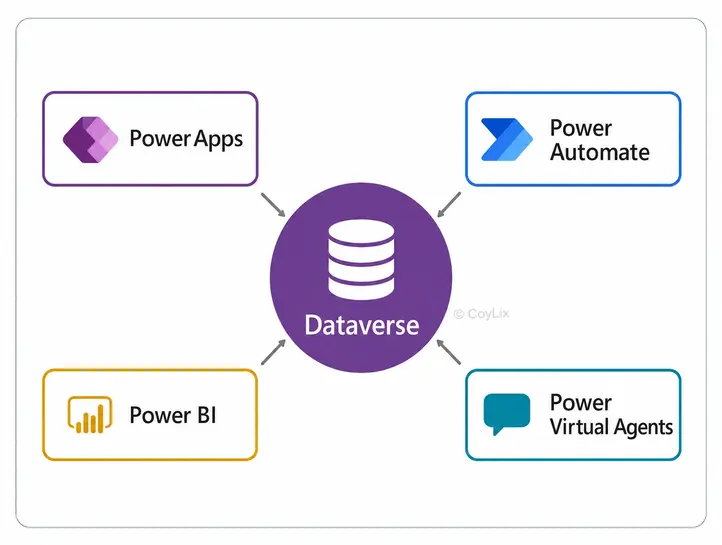
â€ĸ Real use case: A company wants to build an expense-tracking app. They store expense records, users, categories, approvals — all in Dataverse — so that Power Apps, Power Automate, and Power BI can easily connect and use them.


What is DataVerse - CourseElevate

Microsoft says: “Dataverse lets you securely store and manage data that’s used by business applications.”

2. How does Microsoft Data verse differ from traditional relational databases?

Below are the diffences between Data verse and any other traditional relational databases?

Feature Dataverse Traditional Database
Management Microsoft manages infra, backups, scaling You manage servers, backups, scaling
Ease of Use Low-code, easy for non-developers Needs SQL & technical expertise
Business Logic & Security Built-in rules & role-based security Must build/configure manually
Integration Works seamlessly with Power Platform, Teams, Dynamics 365, Power BI etc. Integration possible but needs more custom work.
Scaling Suited for business apps & moderate data Better for very large/complex datasets
Cost Subscription/licensing & managed service cost Infra, maintenance & staff cost
Best Use Ideal when you want quick app development, business-user Best when you need: large scale data

3. What is the purpose of forms and views in Dataverse?

In Microsoft Dataverse, forms and views are essential tools that shape how users interact with data. While they both serve to display information, they cater to different user needs and scenarios.

Forms: 

Forms in Dataverse make it easy to create and update individual records. They give users a simple interface with fields (text boxes, dropdowns, date pickers, etc.) to enter or edit data. You can add new records or update existing ones directly through forms, without dealing with complex backend logic.

Types of Forms:

â€ĸ Main Form: The primary interface for creating and editing records.

â€ĸ Quick Create Form: A lightweight form with only key fields for fast record creation.

â€ĸ Quick View Form: Shows related data from another record without leaving the current screen.

Views: 

Views in Dataverse control how records are shown in a list. They decide which columns appear, how data is sorted, and what filters are applied—helping users quickly find what matters. Views can also be tailored so different roles see only the information they need.

Types of Views:

â€ĸ System Views: Built-in views, often used for admin tasks.

â€ĸ Public Views: Custom views shared with everyone in the organization.

â€ĸ Personal Views: User-created views for individual customization.

For a deeper understanding , you can refer to Microsoft’s resources:


4. What are the common data types (column types) supported in Data verse?

Dataverse supports different column types to store and manage data. The most common ones are:

â€ĸ Text – Single line, multiple lines, email, URL, phone, auto-number
â€ĸ Numeric – Whole number, decimal, floating point, currency
â€ĸ Date & Time – Date only, date & time
â€ĸ Choice – Single choice, multi-select choice
â€ĸ Boolean – Yes/No values
â€ĸ Reference – Lookup (links to another table)
â€ĸ File – File, Image
â€ĸ Calculated & Rollup – Formula-based (calculated) or aggregated (rollup) values

5. How do business rules work within Microsoft Data verse?

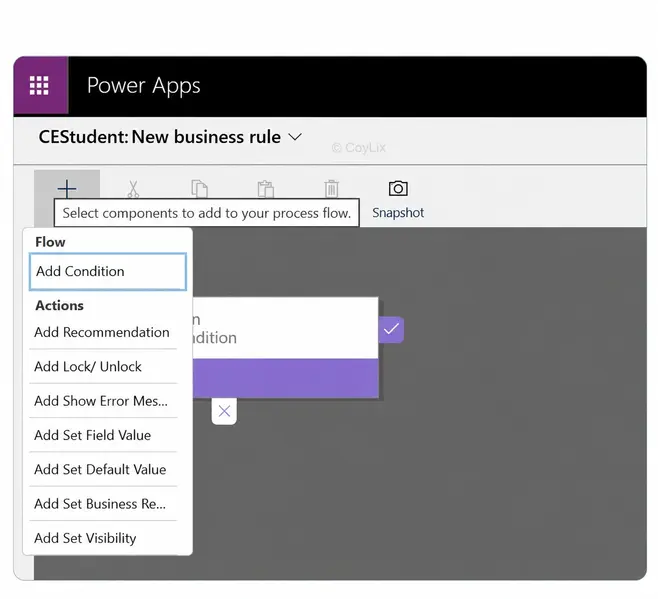
Business rules in Dataverse provide a no-code way to enforce logic and data consistency at the table level.

They allow you to define conditions and actions without writing code, and they work consistently across all apps that use the table — including Canvas Apps, Model-driven Apps, and the API.

â€ĸ Set or clear field values

â€ĸ Make a field required

â€ĸ Show or hide fields

â€ĸ Display error messages for validation

Example:

Suppose you’re working with an Order table: Then you can setup following business rule.

Business Rules in Data Verse - CourseElevate
IF: Order Amount > $100,000
	THEN:
	â€ĸ Set 'Requires Approval' field to Yes.
	â€ĸ Make the 'Approver' field visible and required.

Another example is

 If : OrderStatus = "Cancelled", 
   THEN
       â€ĸ Hide the 'Shipping Date' field.

This helps ensure data integrity and improves user experience without custom code.

Key Points to Note:

â€ĸ Business rules generally run on the client side (when a form is opened or when values change on that form).

â€ĸ The scope determines where they apply — e.g., “All Forms” will enforce the rule across all forms for that table.

â€ĸ They don’t support multi-select choice fields, which is a known limitation.

Overall, business rules are a quick and maintainable way to enforce table logic, especially for scenarios where full Power Automate flows or plugins might be overkill.

6. How are relationships defined and managed in Dataverse?

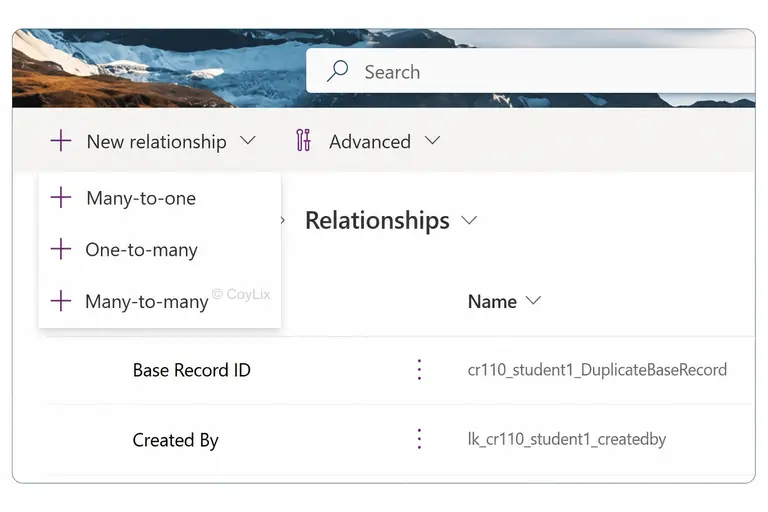
In Microsoft Dataverse, relationships define how records in one table connect to records in another, allowing you to build richer data models and enable seamless integration across apps.

There are three main types of relationships:

â€ĸ One-to-Many (1:N): One record in a table can relate to many in another.

Example: A single Customer can have multiple Orders. This is implemented by adding a lookup column in the related table (e.g., Orders → Customer).

â€ĸ Many-to-One (N:1): The reverse of 1:N, where multiple records relate back to a single record.

Example: Multiple Orders link back to one Customer.

Relationship in Data Verse - Course Elevate

â€ĸ Many-to-Many (N:N): Multiple records in both tables can relate to each other.

Example: A Student can enroll in many Courses, and each Course can have multiple Students. Dataverse handles this using an intersect (junction) table.

By defining these relationships, Dataverse ensures data integrity, supports relational queries, and provides flexibility in app design without requiring complex coding.

7. What’s the difference between a standard table and a custom table in Dataverse?

In Dataverse, tables are of two types: standard and custom

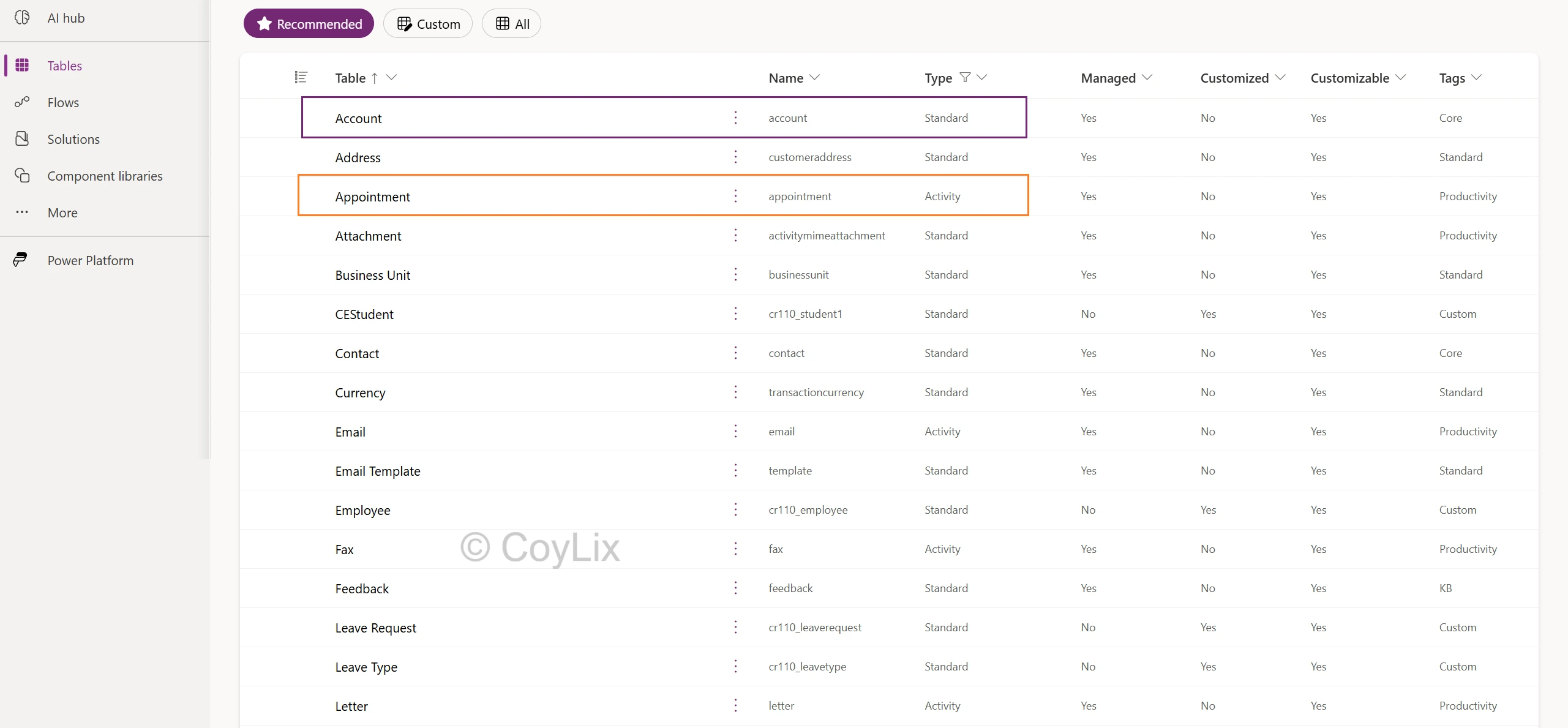
Standard Tables are predefined and come out-of-the-box. They cover common business needs such as Accounts, Contacts, and Users. You can customize them slightly, but their core structure is fixed. They don’t have any prefix and used in the common scenarios.

Custom Tables are user-defined. They give you flexibility to add columns, relationships, and business logic for specific needs. You can also choose the ownership model (User/Team or Organization), and they usually carry a prefix (e.g., new_project) to distinguish them.

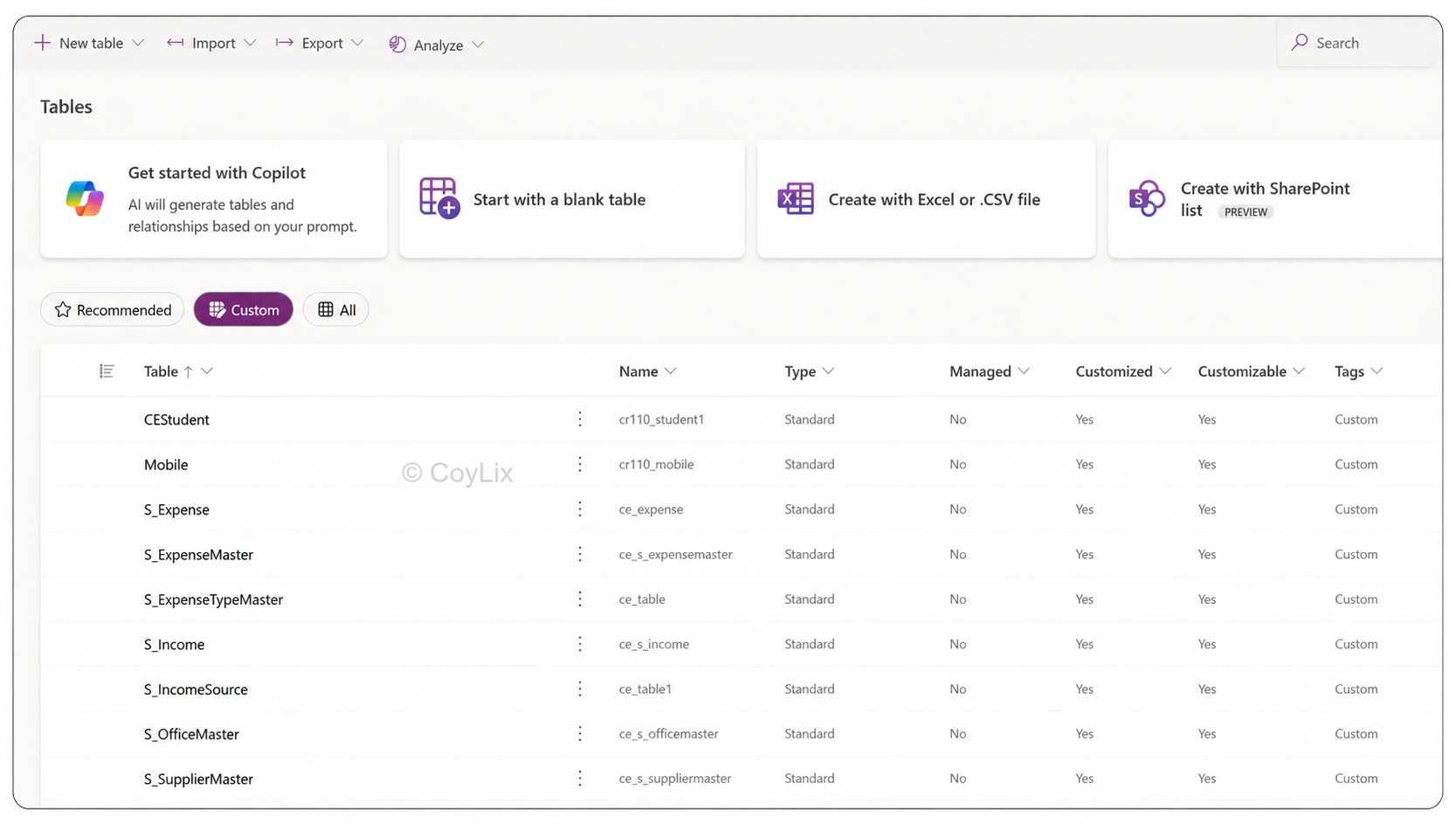
If you click on Custom Tab section, it will give you custom tables created in the dataverse as shown below. Whereas All tab will display all types of tables.
Custom Tables in Data Verse

8. What is the “primary name column” or “primary key” in a dataverse table?

In Microsoft Dataverse, each table includes a Primary Key (system identifier) and often a Primary Name Column (human-friendly identifier). They serve distinct but complementary purposes.

Primary Key

â€ĸ A system-generated GUID that uniquely identifies each record.

â€ĸ Default format is <tablename>Id (e.g., accountid for Account, contactid for Contact).

â€ĸ Cannot be renamed or changed; ensures data integrity and relationships.

â€ĸ Used for CRUD operations and to establish links between tables.

Primary Name Column

â€ĸ A text-based field that provides a user-readable label for records.

â€ĸ Defaults to <tablename>name, but can vary (e.g., fullname in Contact).

â€ĸ Can be customized; helps users quickly recognize records in forms, views, and lookups.

â€ĸ Should be kept meaningful and unique to avoid confusion.

Key Takeaway

The Primary Key secures uniqueness at the system level, while the Primary Name Column improves usability by giving records a clear display name. Both are essential for effective data management in Dataverse.


9. What is a lookup column / “foreign key” in Data verse?

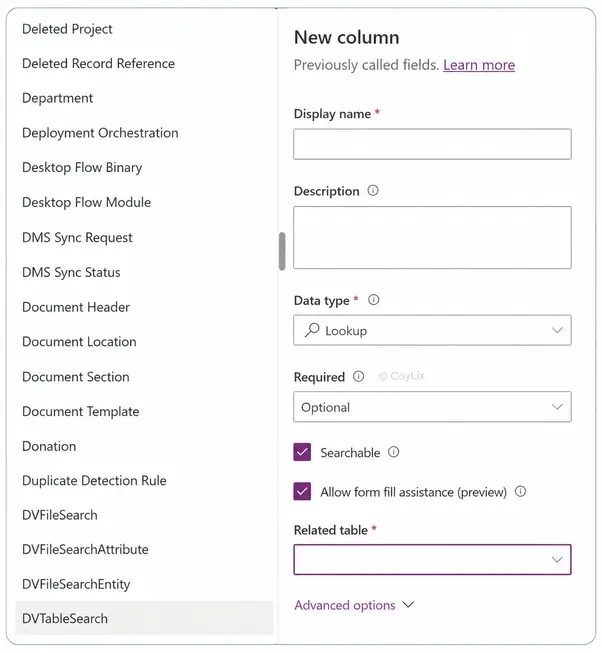
A lookup column in Microsoft Dataverse is how you reference a record from another table—similar to a foreign key in traditional databases. It links two tables, allowing relationships and cross-references between their data. A lookup column stores the reference to another table’s primary key.

For example:

In your Order table:

â€ĸ You might add a lookup column Customer that points to a record in the Customer table.

â€ĸ When creating or editing an Order, you select which Customer it belongs to (via lookup).

Because that lookup gives you access to related fields, you can show Customer name, address, etc., directly or via logic.

In the screenshot, when creating a new column, selecting the Lookup data type requires specifying a Related Table. This tells Dataverse which table the lookup will point to

Key Takeaway

A lookup column acts as a relational bridge in Dataverse—functioning like a foreign key—ensuring tables can share and display meaningful related data.

Lookup Columns in Data Verse - CourseElevate

10. What are the core components of the Dataverse data model?

Following are the data verse core components.

  • Tables
  • Columns
  • Records
  • Relationships
  • Business logic
  • Security Model
  • Data Types
  • Standard Vs Custom Tables

To know more about this. Click on below button

View Detailed Answer
Core Components in Data Verse : CourseElevate

11. What is a choice (optionset) column and how is it used in Dataverse?

In Microsoft Dataverse, a Choice (formerly known as an Option Set) column is a specialized field that allows users to select a value from a predefined list of options. This column type is particularly useful for categorizing data, ensuring consistency, and simplifying data entry.

A Choice column provides a set of predefined options from which users can select a single value.

This column is commonly used for fields like Status, Priority, Category, or Type, where the values are limited and standardized.

Example:

In a Service Request table, a Priority field might offer options such as Low, Medium, and High.

FAQs

Dataverse is Microsoft’s secure, cloud-based data platform serving as the central storage for Power Apps, Power Automate, and other Power Platform components. It is used for its robust data modeling, enterprise-grade security, and scalability for business applications.

Entities, now commonly referred to as tables in Dataverse, are the fundamental structures used to organize and store specific types of data. They function similarly to tables in a traditional relational database, consisting of rows (records) and columns (fields).

Dataverse implements a robust, multi-layered security model, allowing control over access at the organizational, business unit, record, and even column level. It uses security roles and field security profiles to ensure data access aligns with user responsibilities.

Dataverse seamlessly integrates with Power Apps as a native data source for building rich applications, and with Power Automate for automating workflows. Its tight integration provides a unified and secure data backend for the entire Power Platform ecosystem.

Watch The Videos

Leave a Reply

Your email address will not be published. Required fields are marked *

Scroll to Top