
Monitoring Power Automate flows ensures your automation runs smoothly and helps you quickly identify issues when something goes wrong. Here are the main ways to keep track of your flows:
1. Run History (Power Automate Portal)
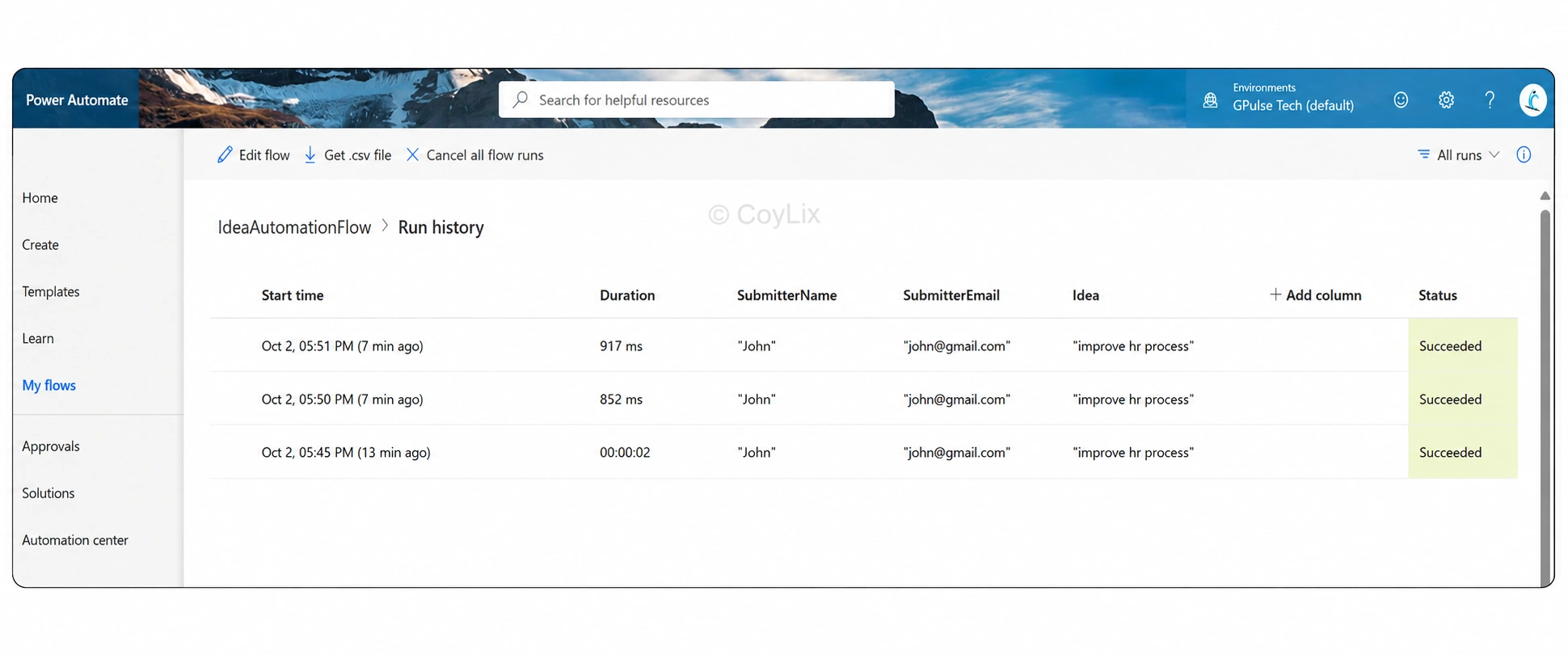
Navigate to Flow → Run History to view each execution.
You’ll see:
Date and time the flow started
Total run duration
Input parameters passed
Final status (Success or Failure)
This is the most common way to troubleshoot specific flow runs.
2. Analytics Tab
Found in the flow’s Details page, the Analytics tab provides built-in dashboards.
You can review:
Usage trends (last 7, 14, or 30 days)
Error rates
Performance bottlenecks
Perfect for spotting recurring issues or measuring adoption.
3. Power Platform Admin Center
Ideal for administrators managing flows across environments.
Provides an overview of:
Failed runs at scale
Connector usage
Environment-level capacity insights
4. Notifications & Alerts
Enable email or mobile app notifications for flow failures.
This allows you to get alerts instantly without manually checking run history.
5. Center of Excellence (CoE) Kit
Larger organizations often deploy the Power Platform CoE kit.
It sets up advanced monitoring, automated alerts, and governance dashboards.
Helpful for proactively managing hundreds of flows across teams.
Summary
In real-world scenarios, the right monitoring option depends on your role:
Run History & Analytics → best for makers tracking individual flows.
Admin Center & CoE Kit → best for IT admins managing environments.
Notifications → best for quick, proactive alerts.
By combining these tools, you can ensure your Power Automate flows remain reliable, scalable, and error-free.




