

1. What is Microsoft Power Platform? (Power Platform Interview Questions)
In many Power Platform interview questions, you are first asked what Microsoft Power Platform is. In simple terms, Microsoft Power Platform is a group of tools that help businesses work faster and smarter without needing heavy coding.
Today, every company wants to reduce manual work, connect their data, and build solutions quickly. Power Platform makes this possible. Think of it as a powerful toolbox that allows both business users and developers to build apps, automate processes, analyze data, and even create AI-powered solutions.
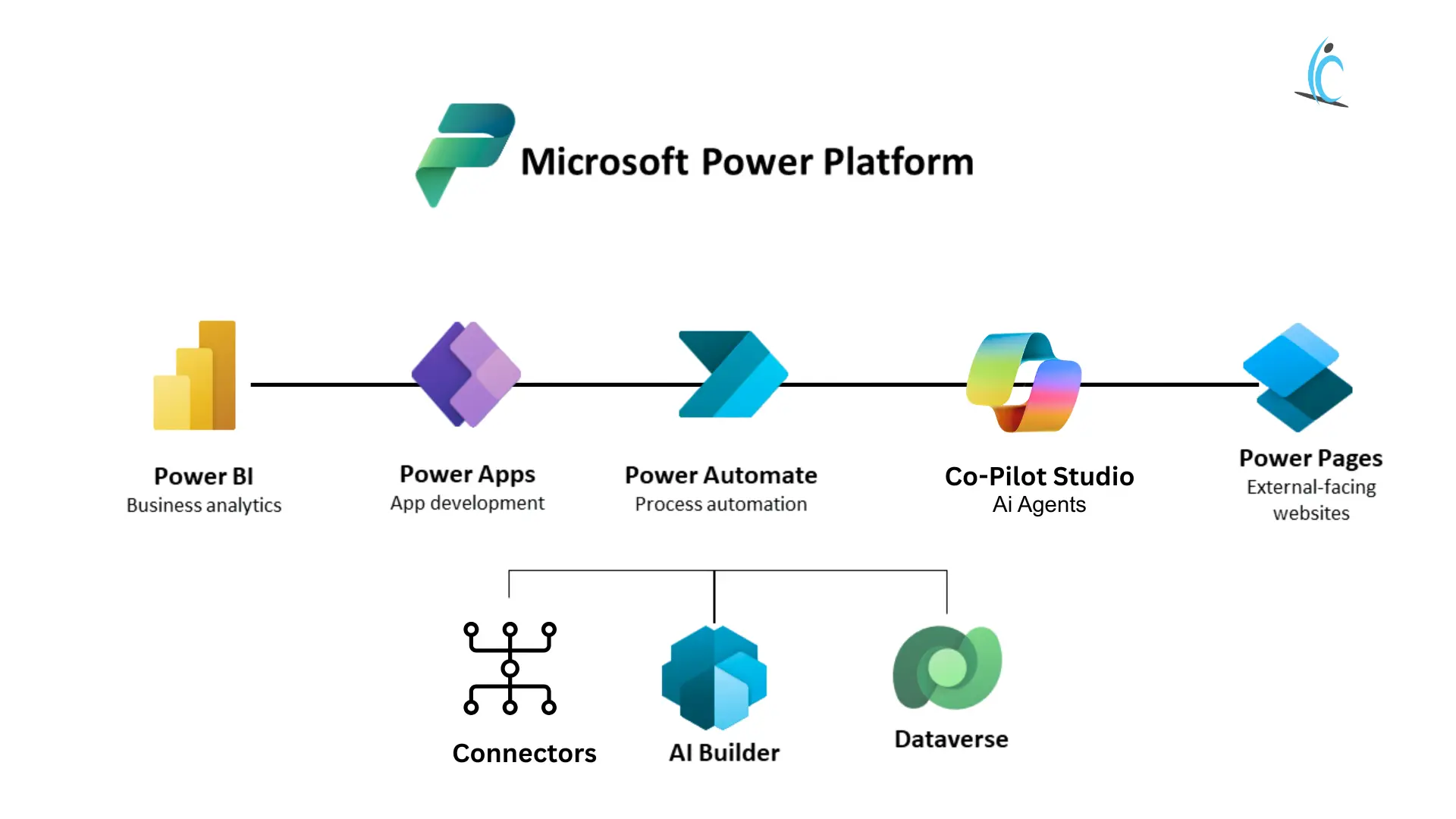
Power Platform includes five main products:
 Power BI
 Power BI
Power BI is used for data analysis and reporting. It turns raw data into interactive dashboards and visual reports. Instead of looking at complex Excel sheets, you can see clear charts and insights that help managers make better decisions.
Power Apps
 Power Apps
Power Apps allows you to build custom business applications with little or no code. For example, you can replace manual Excel trackers with a proper app for leave management, expense approval, or inventory tracking.
Power Automate
 Power Automate
Power Automate helps automate repetitive tasks. For example, when someone submits a form, it can automatically send an email, update a SharePoint list, or notify a manager in Teams. It saves time and reduces human errors.
Copilot Studio
 Copilot Studio
Copilot Studio lets you build AI chatbots and virtual assistants. Earlier known as Power Virtual Agents, it now supports advanced AI features. Businesses use it to create support bots or internal help assistants.
Power Pages
 Power Pages
Power Pages is used to build secure external websites for customers, partners, or vendors. Unlike Power Apps, which is mainly for internal use, Power Pages is designed for public-facing portals.
Supporting Components
In addition to these products, Power Platform also includes:
- Connectors – These connect your apps and flows to services like Outlook, SharePoint, SQL, Salesforce, and many others.
- AI Builder – Adds artificial intelligence to your apps, such as reading invoices or analyzing text.
- Dataverse – A secure cloud database that stores business data in structured tables.
In short, Microsoft Power Platform helps organizations analyze data, build apps, automate work, create AI solutions, and manage information — all within one connected ecosystem.
2. What is the Purpose of Microsoft Power Platform?
The main purpose of Microsoft Power Platform is to help people work smarter and faster using low-code tools.
It allows both technical and non-technical users to build solutions without depending completely on developers.
Power Platform helps organizations:
- Build apps easily using Power Apps
- Automate repetitive tasks using Power Automate
- Analyze data and create dashboards using Power BI
- Connect different systems and data sources in one place
- Reduce development time and cost with low-code tools
- Improve collaboration through shared data and connected processes
For example, instead of handling approvals through emails and Excel sheets, a company can build a simple app and automate the entire workflow.
In short, Microsoft Power Platform makes it easier to build, automate, analyze, and improve business processes within one connected ecosystem.
3. Can Power Platform Integrate with Dynamics 365?
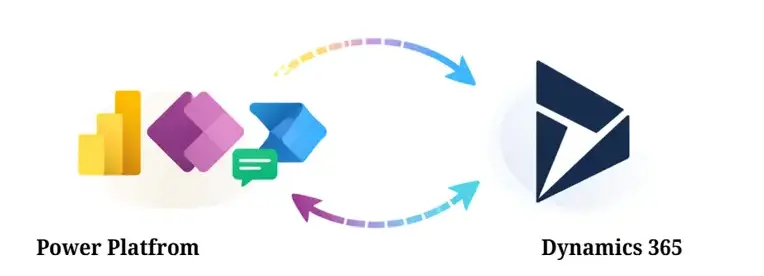
Yes, Power Platform integrates fully with Dynamics 365.
Both systems use Microsoft Dataverse as their shared data platform. In fact, Dynamics 365 apps like Sales and Customer Service are built as model-driven apps on Dataverse. That’s why the integration feels seamless — they already run on the same foundation.
Because they share the same data and security model, you can easily extend Dynamics 365 using Power Platform tools.
For example:
- Use Power Apps to build custom apps that use the same Dataverse tables as Dynamics 365.
- Use Power Automate to automate CRM or ERP processes, such as sending notifications when a new lead is created.
- Use Power BI to create dashboards and reports directly from Dynamics 365 data.
Model-driven apps are important here because they follow the same roles, security settings, and business rules as Dynamics 365. This means any extension you build works smoothly within the existing environment.
In simple terms, Dynamics 365 and Power Platform are designed to work together. Power Platform helps you customize, automate, and analyze Dynamics 365 using low-code tools without breaking the system.
4. What Are the Available AI Models in Power Platform?
AI Builder provides AI capabilities. It includes prebuilt models, custom models, and GPT-based models.
Prebuilt AI Models
Prebuilt models are ready to use. You don’t need to train them.
For documents and images, examples include:
- Business Card Reader
- Receipt and Invoice Processing
- ID Reader
- Text Recognition
- Image Description
For text and language, AI Builder can:
- Analyze sentiment
- Extract key phrases
- Identify entities
- Detect language
- Translate text
These models work immediately and are useful for common business scenarios.
Custom AI Models
If your business has specific needs, you can create custom models such as:
- Prediction models
- Object detection
- Custom category classification
- Custom entity extraction
- Custom document processing
Therefore, You train these models using your own data.
GPT-Based Models
Power Platform also supports GPT models through Prompt Builder. These are used for conversational AI and text generation in apps and flows.
In simple terms, Power Platform offers three types of AI: ready-to-use models, custom-trained models, and GPT-based generative AI — depending on your business requirement.
5. What Are the Security Features of the Power Platform?
Power Platform has strong security to protect users and business data. It works in different layers.
User Login and Identity
Every user must sign in using Microsoft Entra ID.
If Multi-Factor Authentication (MFA) is enabled, users must verify their identity with an extra step, like a code on their phone.
No valid login means no access.
Data Loss Prevention (DLP) Policies
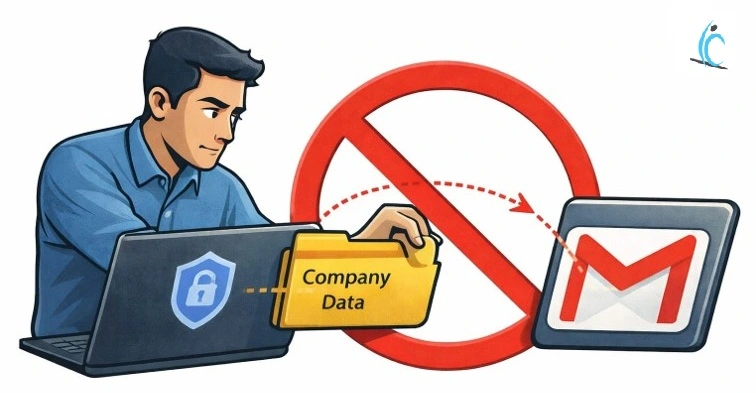
Admins can control how data moves between apps and services.
For example, they can stop company data from SharePoint from being sent to personal Gmail. Connectors can be marked as Business, Non-Business, or Blocked.
Separate Environments
Companies can create different environments like Development, Test, and Production.
This ensures that changes made during testing do not affect live users.
Dataverse Security Roles
In Dataverse, admins can control what users are allowed to do — like creating, editing, or deleting records.
They can also hide sensitive fields, such as salary details, from certain users.
Audit Logs
Audit logs track who did what and when.
Admins can review activity and improve security if needed.
In simple words, Power Platform protects identity, controls data access, separates environments, and monitors activity to keep business information secure.
Tenant Isolation
Tenant isolation prevents company data from being shared with other organizations.
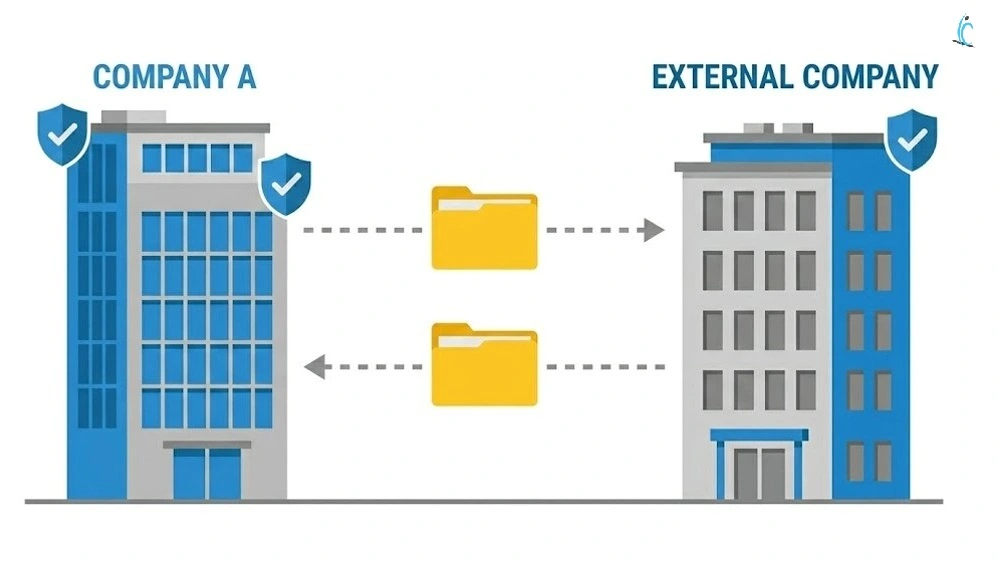
This protects data from leaving the company by mistake.
6. What is the Role of Dataverse in Power Platform?
Dataverse is the main database of Power Platform. It is the place where all your business data is stored.
When you build an app in Power Apps, the data can be saved in Dataverse. When that data changes, Power Automate can run automatically. Power BI can use the same data to create reports and dashboards. Because everything connects to Dataverse, all tools work together smoothly. Data verse act as a central Data Layer
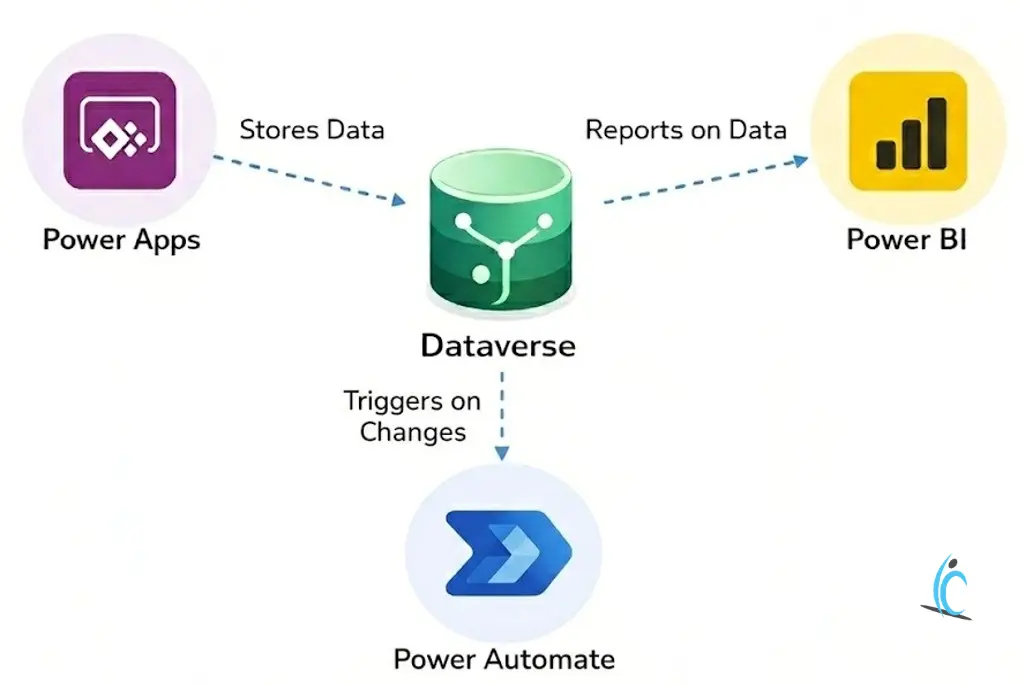
Dataverse also keeps your data secure. You can decide who can see, edit, or delete records. You can even hide certain fields, like salary, from specific users. You can also add simple rules to make sure data is entered correctly.
It can handle a large amount of data and works well for small as well as big organizations. It runs on Microsoft Azure, which makes it reliable and secure.
In simple words, Dataverse is the central place where data is stored and managed in Power Platform.
7. What is the relationship between Power Platform and Microsoft 365?
Power Platform and Microsoft 365 work very closely together. They are part of the same ecosystem.
They use the same login system (Microsoft Entra ID), the same users, and the same tenant. That means if your company already uses Microsoft 365, you
do not need a separate account to use Power Platform.
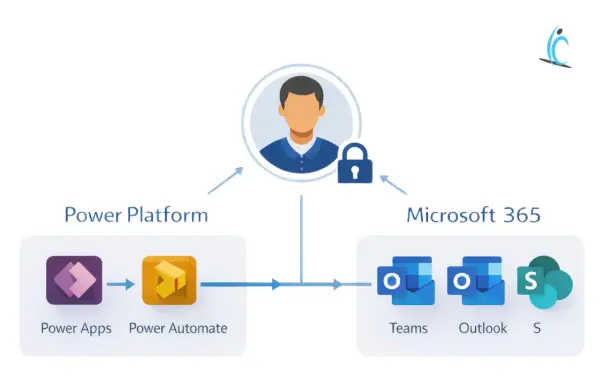
Power Platform connects directly with apps like Teams, SharePoint, Outlook, Excel, and OneDrive. For example, you can build a Power App inside Teams, automate Outlook emails using Power Automate, or show a Power BI dashboard in SharePoint.
They also share the same security and compliance settings. So admins can manage everything from one place.
In simple words, Microsoft 365 is where people do their daily work, and Power Platform helps automate and improve that work — using the same system and security.
8. Can Power Platform Work Without Coding at All?
Yes. For most business needs, Power Platform can work without writing code.
Each product is designed so that regular business users can build solutions using visual tools.
- Power Apps lets you create apps using drag-and-drop controls.
- Power Automate allows you to build workflows using ready-made templates.
- Power BI helps you create dashboards by simply selecting charts and fields.
- Copilot Studio allows you to build chatbots using guided steps.
- Power Pages helps you design websites using pre-built components.
So for everyday tasks like leave management, approvals, reporting, or simple automation, you do not need coding.
However, there is an important point to understand.
When business requirements become more complex, you may need low-code, not full coding. For example:
- Writing simple Power Fx formulas (similar to Excel formulas)
- Using expressions in Power Automate
- Creating custom connectors
- Adding small scripts in advanced scenarios
But full programming is rarely required. Most companies successfully build internal apps and automations without traditional coding.
In simple words, Power Platform is built for non-developers — but it also allows developers to extend it when needed. That flexibility is what makes it powerful.
9. What Are the Limitations of Low-Code Platforms?
Low-code platforms are fast and easy to use. However, they are not perfect. They have some limits.
Limited Customization
Low-code tools use drag-and-drop components. This works well for normal business apps.
But if you need a very unique design or advanced user experience, it becomes difficult.
You may have to adjust your idea… or ask a developer to write custom code.
Performance with Large Data
Low-code platforms work well with small to medium data.
But if your app handles millions of records or very complex queries, performance can slow down.
For example, in Power Apps, some queries have limits when working with large data sources.
These tools are not meant to replace heavy enterprise systems.
Vendor Lock-In
If you build everything on one platform, you depend on that company.
Moving your apps to another platform later can be very difficult.
Licensing costs may also increase over time.
Complex Logic Can Become Messy
Simple workflows work perfectly. However, when business rules become very complex many conditions, loops, error handling — things can get hard to manage.
Debugging is not as easy as traditional coding.
Real Example
You can easily build a leave management app or approval system using low-code.
But building something like an online trading platform with real-time data and heavy calculations is very difficult using low-code tools alone.
Final Thought
Low-code is great for regular business solutions.
For very advanced systems, professional coding may still be needed.
The following Power Platform interview questions focus on advanced concepts like environments and administration
10. How Does Licensing Impact Power Platform Implementation?
Licensing is very important in Power Platform. In fact, it affects what you can build , how you build it, and how much it will cost.
Licensing Decides What You Can Use
Your license controls which features, connectors, and components you can access.
For example:
Without a Premium license, you cannot use Dataverse.
You cannot use premium connectors like SQL Server.
Some advanced features may be blocked.
So licensing directly affects your solution from the beginning.
Licensing Affects Your Design
Licensing also changes how you design your system.
For example:
- If you do not have Dataverse, you may need to use SharePoint or another data source.
- If your app is for external users, you need Power Pages licensing.
- Some advanced environment features need special licenses.
That’s why you should check licensing before designing the solution.
Licensing Affects Cost
Power Platform has different pricing models, like per-user and pay-as-you-go.
There are also extra costs for:
- Dataverse storage
- AI usage
- Desktop flows (RPA)
If licensing is not planned properly, costs can increase later.
Licensing Affects Growth
As your solution grows:
- More users may need licenses
- More automation runs may increase usage
- More AI features may need extra credits
So always plan licensing for the future, not just for today.
Final Line
Licensing impacts everything — what you build, how you design it, how much it costs, and how it scales.
In real projects, always check licensing first, then design your solution.
11. What Are Power Platform Environments?
Power Platform environments are separate workspaces used to organize apps, flows, and data.
Think of them like separate rooms inside one building.
For example, developers build new features in the Development environment. After testing in the Test environment, the final version is moved to Production, where employees actually use it.
Each environment has its own data, security roles, and settings. This separation protects live systems from mistakes.
For example, if a developer makes an error while testing a new feature, it will not affect real users in Production.
Environments help teams follow a proper release process and maintain control over changes.
12. What Is the Power Platform Admin Center?
The Power Platform Admin Center is the main control panel used by administrators to manage the entire Power Platform.
It is the place where organizations control environments, users, security, and overall platform settings.
From the Admin Center, administrators can:
- Create and manage environments such as Development, Test, and Production
- Set Data Loss Prevention (DLP) policies to control how data moves between apps and services
- Manage users and assign security roles to control who can access or edit data
- Monitor usage and analytics to see how apps and flows are being used
- Check storage capacity and licensing details to manage costs
- View audit logs to track user activity and system changes
For example, if a company wants to block company data from being shared with personal email accounts, the rule is created in the Admin Center.
If a new project starts, admins create a new environment from here.
In many advanced Power Platform interview questions, the Admin Center is discussed because it controls security, governance, environments, and platform health — all in one place.
These Power Platform interview questions cover fundamentals, architecture, security, licensing, environments, and administration. If you prepare these topics well, you can confidently answer them in your Power Platform interview.
Learn next



