

Power Apps licensing has changed in 2026, and many developers are confused about what this actually means for their apps, their companies, and their careers. This guide explains Power Apps Licensing 2026 in a simple, practical way for developers and interview preparation.
This topic is also starting to appear in interviews.
In this article, I’ll explain Power Apps licensing in a simple and practical way so you can clearly understand:
- What changed in 2026
- Which license options exist today
- How much they cost
- When to use each license
- How to answer licensing questions confidently
Let’s start.
What Changed in Power Apps Licensing 2026?
Microsoft has officially ended new sales of the Power Apps Per App license starting January 2, 2026.
This is the biggest Power Apps licensing change since 2019.
What this means
- New customers cannot purchase the Per App license
- Existing EA / EAS customers can continue and renew
- Existing CSP customers can continue and renew
- MPSA customers can use it until their agreement ends, plus a 60-day migration window
Microsoft’s Direction
The Per App license is being retired long-term.
Why this matters
The $5 per user per app model was heavily used by thousands of organizations.
That low-cost option is now gone for new buyers.
Power Apps Licensing 2026 – Before vs After
Before January 2026
- Power Apps Premium (Per User)
- Power Apps Premium (Volume Pricing – 2000+ licenses)
- Pay-As-You-Go (PAYG)
- Per App Plan
After January 2026
- Power Apps Premium (Per User)
- Power Apps Premium (Volume Pricing – 2000+ licenses)
- Pay-As-You-Go (PAYG)
- Per App Plan → Discontinued for new customers
Everything stays the same except the Per App plan.
That is the core change.
Power Apps Premium (Per User License)
Pricing
- $20 per user per month
- $12 per user per month (minimum 2000 licenses)
What You Get
- Unlimited custom apps
- Unlimited Power Pages websites
- Full Dataverse
- Premium & custom connectors
- On-premises data gateway
- 500 AI Builder credits per user per month (until Nov 2026)
- 250 MB Dataverse database per license
- 2 GB file storage per license
- Power Automate usage rights
Best For
- Power users
- Developers
- Teams building many apps
- Organizations doing serious automation
In simple words: If a user builds or uses many apps, Premium is usually the best choice.
Pay-As-You-Go (PAYG)
Pricing
- $10 per active user per app per month
- Billed through Azure
How It Works
A user is charged only if they open the app in that month.
If they don’t open it → no cost.
What You Get
- Same features as Premium
- Premium connectors
- Dataverse
- Custom connectors
- 1 GB database storage per environment
- 1 GB file storage per environment
Best For
- Pilot projects
- Seasonal apps
- Proof of concept
- Occasional users
Caution
If users open the app daily, PAYG can become more expensive than Premium.
You must monitor Azure costs.
Microsoft 365 Included Rights (Power Apps Basic)
Many organizations already have limited Power Apps capabilities through Microsoft 365.
Included
- Canvas apps
- Standard connectors only (SharePoint, Outlook, OneDrive, Teams, Excel)
- Dataverse for Teams (2 GB)
- 6,000 API calls per day
- 50 MB Dataverse storage per user
Not Included
- Premium connectors
- SQL Server, Salesforce, SAP
- Custom connectors
- AI Builder
- Full Dataverse
- On-prem gateway
- Managed environments
Hidden Trap
If you add even one premium connector to an app:
Every user now needs Premium or PAYG.
Microsoft 365 rights are great for simple SharePoint apps, but not enterprise solutions.
Real Cost Scenarios
Scenario 1 – Small Company, One App
- 50 employees
- 1 app
- 30 users
PAYG
30 × $10 = $300 per month
Premium
30 × $20 = $600 per month
PAYG is cheaper
Scenario 2 – Seasonal App
- 200 employees
- App used only 3 months
- 20 users
PAYG
20 × $10 × 3 months = $600 per year
Premium
20 × $20 × 12 months = $4,800 per year
PAYG is best
Scenario 3 – Power User (Many Apps)
- 1 user
- Uses 5 apps
PAYG
5 × $10 = $50 per month
Premium
$20 per month
Premium is cheaper
Scenario 4 – Large Enterprise
- 5000 employees
- 2000 need premium access
Enterprise Premium
2000 × $12 = $24,000 per month
Lowest per-user price
Scenario 5 – Simple Microsoft 365 Apps
- 3000 users
- Only SharePoint, Teams, Outlook
- No premium connectors
Use Microsoft 365 included rights
Extra cost = $0
Dataverse Storage Increase (December 2025)
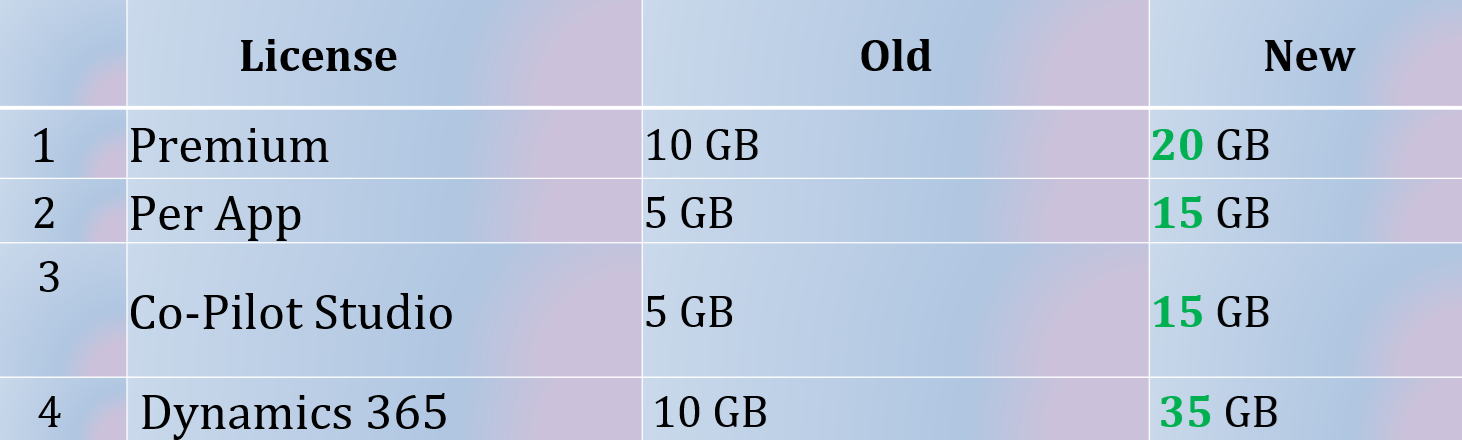
- Automatic
- No extra cost
- File storage also increased
This mainly helps:
- Data-heavy apps
- Model-driven apps
- AI-driven solutions
This is a good change.
AI Licensing Change – AI Builder to Copilot Credits
- Nov 2025 → Dual mode starts
- Nov 2026 → Only Copilot Credits
Until 2026:
- Premium → 500 AI Builder credits per user per month
Copilot Credits:
- $0.01 per credit
What You Should Do
- Measure AI usage
- Forecast future needs
- Plan budget
Power Apps Licensing 2026 – Simple Decision Framework
- Daily users → Premium
- Occasional users → PAYG
- SharePoint only apps → Microsoft 365
- Many apps per user → Premium
Key Takeaways
- Power Apps licensing has changed
- Per App license is going away
- Premium and PAYG are the future
- Understand usage → Control costs
- Understand licensing → Interview advantage
Who This Article Is For
- Power Apps developers
- Power Platform learners
- Job seekers
- Interview candidates
- Consultants
- Architects
Understanding Power Apps Licensing 2026 helps you control costs and answer licensing interview questions confidently.
Official Microsoft Resources
-
Power Apps Pricing: https://powerapps.microsoft.com/pricing
-
Power Platform Licensing Guide: https://learn.microsoft.com/power-platform/admin/pricing-billing-skus



