

In Power Apps, both Sort and SortByColumns are used to arrange data. Although they may produce similar results, the way they work — and when you should use each one — is different.
The main difference is that Sort supports formula-based sorting but requires nesting when sorting by multiple columns, whereas SortByColumns sorts directly by column names and supports multiple columns in a single function call.
Let’s understand this using the Students example.
Sort Function
The Sort function allows you to sort data using a column or even a formula.
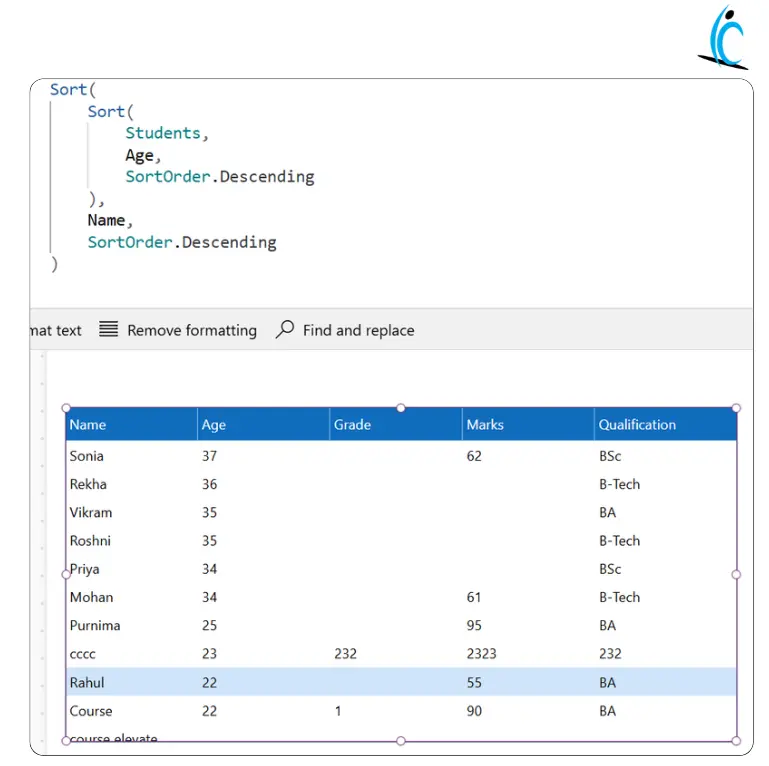
What’s happening here?
- First, the Students table is sorted by Age in descending order.
- Then, the result is again sorted by Name in descending order.
- Since Sort only handles one sorting condition at a time, we use nested Sort for multi-column sorting.
Key points about Sort:
- Uses display column names (Age, Name).
- Supports sorting using formulas.
- Requires nesting for multiple columns.
- Good when you need calculated logic before sorting.
SortByColumns Function
SortByColumns is more direct. It sorts using column names and allows multiple columns in a single function call.
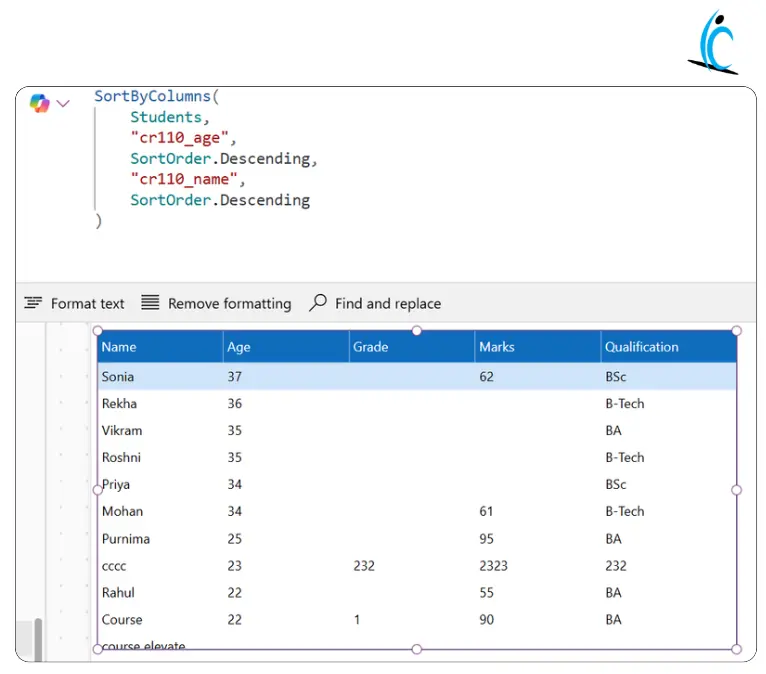
What’s happening here?
- The Students table is sorted first by Age (internal column name cr110_age).
- Then it sorts by Name (cr110_name).
- No nesting is required.
Key points about SortByColumns:
- Uses internal column names (like cr110_age).
- Supports multiple columns directly.
- Cleaner and easier for multi-column sorting.
Difference between Sort and SortByColumns
| Feature | Sort | SortByColumns |
| Sorting Method | Uses a column or a formula | Uses column names only |
| Formula Support | Supports calculated expressions | Cannot use formulas |
| Multiple Columns | Requires nested Sort | Supports multiple columns directly |
| Column Reference | Uses display names (Age, Name) | Uses internal names (cr110_age) |
Interview-Ready Summary
- Sort is more flexible because it supports formula-based sorting.
- SortByColumns is cleaner and better for multi-column



